Arduino Uno vs. Raspberry Pi: What's the Difference? A Beginner's Complete Comparison
A thorough beginner-friendly comparison of Arduino Uno and Raspberry Pi. We break down hardware specs, programming environments, power consumption, real-time control, and more to help you pick the right board.
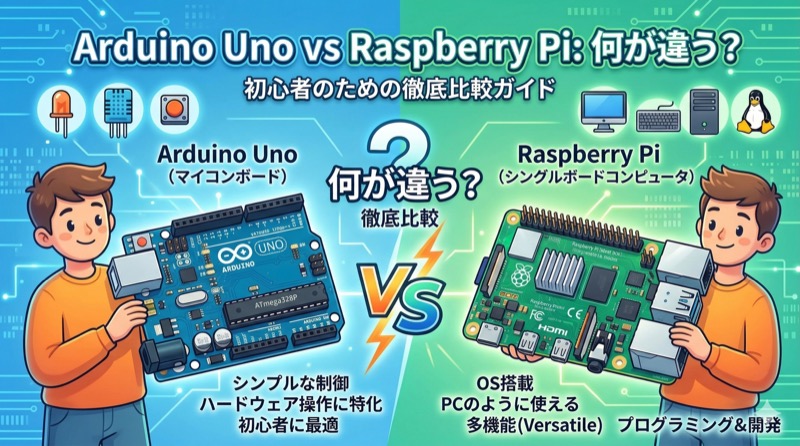
When you start getting into IoT or electronics, two names come up almost immediately: Arduino Uno and Raspberry Pi. They both let you connect electronic components to a small board and build things, so they seem similar — but in reality, they were created for completely different purposes and are used in very different ways. If you're wondering which one to buy, this article will walk you through the differences one by one.
The One-Line Summary: Microcontroller vs. Mini PC
Let's start with the most important distinction. Arduino Uno is a microcontroller (MCU) board. Raspberry Pi is a single-board computer (SBC).
Arduino Uno is a board with a single 8-bit ATmega328P microcontroller chip. It has no operating system — when you power it on, it immediately runs the one program you've pre-loaded onto it. Think of it like the control chip inside a washing machine or microwave. It's built to do one job, repeatedly and very quickly.
Raspberry Pi, on the other hand, is a small computer with an ARM processor. You install Raspberry Pi OS (formerly Raspbian), a Linux-based operating system, and with a monitor, keyboard, and mouse connected, it works just like a regular desktop PC. You can browse the web, watch YouTube, write code — it's a real computer.
Hardware Specs Compared
Lining up the specs makes the difference crystal clear.
Arduino Uno runs an 8-bit processor at 16MHz, with just 2KB of SRAM and 32KB of flash memory. It has 14 digital I/O pins (6 with PWM output), 6 analog input pins, and connects to a PC via a single USB Type-B port. The official board costs around $25-30.
Raspberry Pi 4 Model B, by comparison, packs a 1.5GHz quad-core 64-bit ARM Cortex-A72 processor with 2GB, 4GB, or 8GB of RAM to choose from. It uses a microSD card for storage and comes loaded with two USB 2.0 ports, two USB 3.0 ports, two micro HDMI ports, gigabit Ethernet, Wi-Fi, and Bluetooth. Depending on the model, it runs $35-75. It also has 40 GPIO pins for hardware control.
On paper, Raspberry Pi looks overwhelmingly more powerful — but that doesn't make Arduino useless. They simply excel in completely different areas.
Programming Environment Differences
Arduino uses "Arduino IDE," a dedicated development environment where you program in a simplified language based on C/C++. The code structure is dead simple: write your initialization in setup() and your repeating logic in loop(). An LED blink program is under 10 lines. It's an ideal environment for electronics beginners learning to code for the first time.
For example, blinking an LED at 1-second intervals looks like this:
void setup() {
  pinMode(13, OUTPUT);
}

void loop() {
  digitalWrite(13, HIGH);
  delay(1000);
  digitalWrite(13, LOW);
  delay(1000);
}
Raspberry Pi, being a full Linux environment, supports virtually every programming language — Python, JavaScript (Node.js), C/C++, Java, and more. You can type commands in the terminal, install packages, spin up web servers — basically anything you can do on a regular Linux server. There's more to learn, but the range of possibilities is vastly wider.
Power and Boot: Instant Execution vs. OS Startup
One of Arduino Uno's greatest strengths is that your program runs the instant you connect power. There's no boot time. Plug in a USB cable or attach a 9V battery, and your pre-loaded program starts executing in under 0.1 seconds. Even after a power cut, the program stays in flash memory, so it runs again immediately when power returns. This makes Arduino ideal for always-on sensor monitoring and automated control systems.
Raspberry Pi is a computer, so powering it on means going through an OS boot process — typically 30 seconds to a minute. A sudden power loss can corrupt the SD card's file system. For environments prone to power outages or applications where reliability is critical, Arduino often makes more sense.
Power Consumption Differences
Arduino Uno draws roughly 0.2-0.5W, which is extremely low. It can run for weeks or even months on a single battery, making it great for outdoor environmental sensors or wearable devices. With sleep mode, you can push consumption down to the microamp level.
Raspberry Pi 4 draws about 3-4W at idle, and over 7W under load — more than 10 times Arduino's consumption. Long-term battery operation is impractical. On the flip side, as long as you supply 5V via USB-C, it runs reliably — making it well-suited for always-on servers or media centers where power is available.
Analog Input: Arduino's Exclusive Advantage
Arduino Uno has 6 analog input pins (A0-A5) that can directly read analog signals from temperature sensors, light sensors, potentiometers, and the like. Its built-in 10-bit ADC (analog-to-digital converter) converts 0-5V voltages into values from 0-1023.
Raspberry Pi's GPIO pins only support digital I/O. To read analog sensors, you need an external ADC chip like the MCP3008. This is one reason Arduino has an edge in sensor-heavy projects.
Real-Time Control
With no OS to get in the way, Arduino excels at real-time control. It can generate PWM signals for servo motors with microsecond precision and react to sensor changes instantly. This is why Arduino (and similar microcontrollers) are favored in industrial settings — precisely controlling robot arm joints, adjusting conveyor belt speeds in real time, and similar applications.
Raspberry Pi runs multiple processes simultaneously on Linux, making microsecond-precision timing control difficult. Libraries like pigpio provide some PWM capability, but matching Arduino's stability and precision isn't realistic.
Networking and Connectivity
Raspberry Pi comes with built-in Wi-Fi, Bluetooth, and Ethernet, making internet connectivity trivial. SSH remote access, web servers, API calls — all straightforward. It's perfect for IoT projects that need to send data to the cloud or power web dashboards.
Arduino Uno has no built-in networking. For Wi-Fi, you need a separate module like the ESP8266 or ESP32. That said, Arduino's ecosystem includes Ethernet shields, Wi-Fi shields, Bluetooth modules, and many other expansion boards, so adding connectivity is always an option.
So Which Should You Choose?
The choice comes down to what you want to build.
Arduino Uno is ideal for: Simple automation that reads sensor values and controls LEDs or motors. Devices requiring precise servo or relay control. Battery-powered portable gadgets that need to run for extended periods. Stable systems that need to work the instant power is applied. And beginners who want to learn the fundamentals of electronics.
Raspberry Pi is ideal for: Projects requiring complex computation, like AI-based camera analysis. IoT systems running web servers and databases. Multitasking environments running multiple programs simultaneously. Kiosks or digital signage with GUIs. And development using Python or Node.js in a Linux environment.
The Real Answer: Use Both Together
In practice, Arduino and Raspberry Pi are very often used together. For example, Arduino serves as the field controller — monitoring sensors in real time and controlling motors — while Raspberry Pi acts as the upper-level system, processing data from Arduino, displaying it on a web dashboard, and sending it to the cloud.
The two boards connect easily via serial communication (USB or UART). Arduino reads sensor data and sends it over serial, while a Python program on the Raspberry Pi receives, processes, and stores that data. This way, each board plays to its strengths while covering the other's weaknesses.
Wrapping Up
Arduino Uno and Raspberry Pi aren't competitors — they're complementary. Arduino is the "hands and feet" that directly control hardware. Raspberry Pi is the "brain" that makes decisions and processes information. Start by clearly defining what you want to build, then pick the board that fits.
If you're just getting started, I'd recommend beginning with Arduino Uno and blinking an LED. Once you understand the basic principles of hardware, moving on to Raspberry Pi will make the differences and use cases click naturally. Whichever board you choose, the experience of building something with your own hands is the best education there is.