My Favorite Mouse and Keyboard: A Logitech Review
An in-depth review of the Logitech MX KEYS S keyboard and G102IC wired gaming mouse. From the lightness of a wired mouse to the quiet comfort of a premium keyboard, here's what makes these my daily drivers.

What keyboard and mouse do you use for work, gaming, or just everyday computing? If your answer is "whatever came with the computer" or "I've never really thought about it," I completely understand -- I used to be the same way. But after spending long hours at my desk day after day, I realized just how much the right peripherals matter.
Today, I want to share the Logitech keyboard and mouse I use daily, why I chose them, and what they're actually like to use.
How I Started Caring About Peripherals
When I first started using computers, I honestly didn't care about keyboards or mice. "As long as it works" was my philosophy, and I never gave it a second thought.
But as my screen time kept growing -- both for work and personal projects -- I started noticing discomfort. My hand would ache after hours of mousing. My fingers would hurt from extended typing sessions. Eventually, I asked myself: "Maybe the devices I'm using just aren't right for me?"
That kicked off my journey of visiting electronics stores to try different products, reading reviews, and gradually narrowing down what worked. After testing gear from several brands, I landed on Logitech.
My Mouse: Logitech G102IC Wired Gaming Mouse
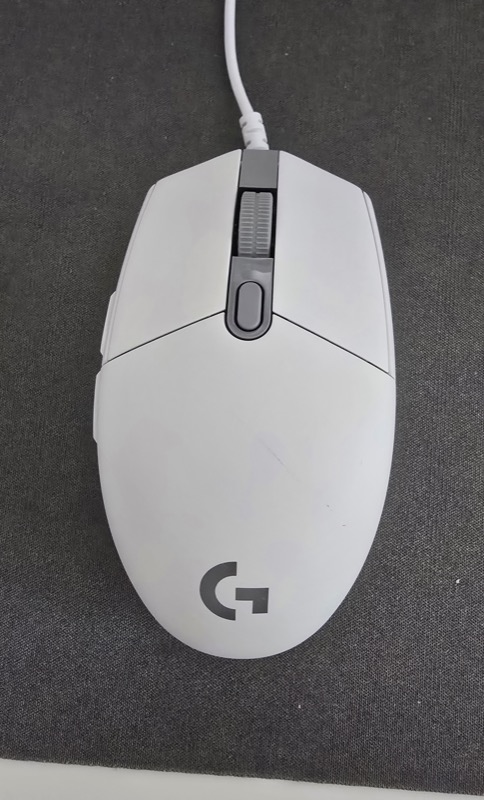
Let's start with the mouse. I use the Logitech G102IC wired gaming mouse. The "gaming mouse" label might conjure images of hardcore gamers, but it's actually an excellent everyday mouse too.
Why I Stick with a Wired Mouse
Wireless mice are increasingly popular these days, and the clean, cord-free look is undeniably appealing. But I deliberately chose a wired mouse.
The main reason? Weight. Many wireless mice still use AA batteries, which add noticeable heft to the device. You might think one battery's weight is negligible, but over hours of continuous use, those extra grams accumulate as real fatigue in your wrist and forearm.
When I was using a wireless mouse, my hand would feel sluggish by late afternoon. Switching to wired eliminated that fatigue noticeably. Of course, there are now lightweight rechargeable wireless options, and some people genuinely prefer going wireless. This is just my personal experience -- but once you feel the lightness of a good wired mouse, it's hard to go back.
How the G102IC Feels in Use
Another major reason I chose the G102IC is its responsiveness and precision. As a gaming mouse, it offers excellent tracking -- the cursor follows my hand movement with satisfying accuracy.
Whether I'm working in spreadsheets, browsing the web, or editing images, the G102IC handles everything without friction. When I need precise cursor placement, it stops exactly where I want it -- and that feels great.
The size fits my hand naturally. Not too big, not too small, it allows for a comfortable grip that doesn't tire me out during extended sessions.
The price is also reasonable. While some high-end gaming mice cost a small fortune, the G102IC delivers impressive performance at an accessible price point. Great value all around.
My Keyboard: Logitech MX KEYS S
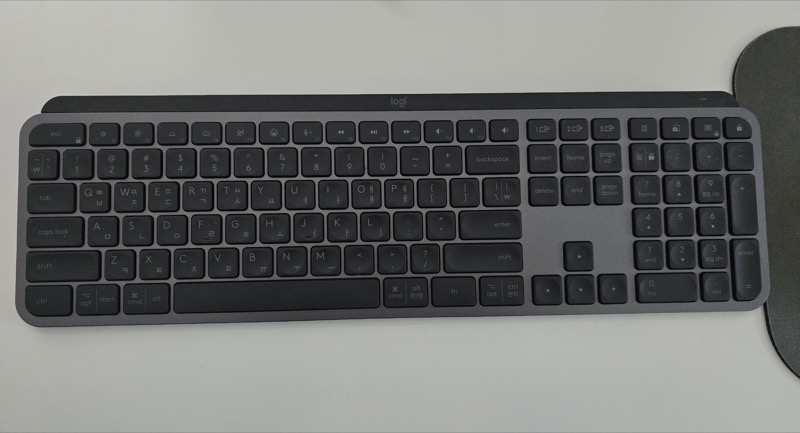
Now for the keyboard. I use the Logitech MX KEYS S, one of Logitech's premium models that's particularly popular among people who prioritize typing comfort.
Why I Chose the MX KEYS S
The number one thing I look for in a keyboard is typing feel. I write a lot for work, so typing speed directly impacts my productivity. Choosing a keyboard that matches my typing style was crucial.
The MX KEYS S exceeded my expectations. The key caps have a subtle concave shape that naturally guides your fingertips to the center of each key. This reduces mistypes and enables smoother, more fluid typing.
Key Feel and Noise
Something people often overlook when choosing a keyboard is how loud it is. In an office or at home during late hours, a clacky keyboard bothers everyone around you -- and drains your own energy too.
The MX KEYS S is remarkably quiet. It uses scissor-switch keys that require light pressure and produce minimal sound. I can work late at night without worrying about waking my family. It's that quiet.
Yet despite the low noise, the tactile feedback is satisfying. There's a solid, responsive feel when you press each key -- not mushy or cheap. It strikes the perfect balance, letting you type with a nice rhythm.
Layout and Design
The MX KEYS S features a clean, efficient layout. It's a full-size keyboard with a number pad, which is essential for number-heavy work.
The overall design is sleek and stylish -- it genuinely elevates your workspace aesthetic. The slim, low-profile build doesn't eat up desk space either.
The price isn't cheap -- it's definitely in the premium category for keyboards. But for a device I use for hours every day, I consider it a worthwhile investment. Once you try it, the value becomes immediately apparent.
What I Value When Choosing Peripherals
Before wrapping up, here are the principles that guide my peripheral choices.
Try Before You Buy
Don't rely solely on specs and reviews. If possible, visit a store and get your hands on the actual product. Hand size, finger length, and typing habits are unique to everyone. No amount of impressive specs matters if the device doesn't fit your hands.
Think About Extended Use
In a 30-minute test, most peripherals feel fine. The real differences emerge after 4 or 6 hours of continuous use. Always ask yourself: "Will this still be comfortable after a long session?"
Balance Price and Quality
Expensive doesn't always mean better, but extremely cheap products often compromise on durability and feel. Since keyboards and mice are daily-use items, investing in reasonable quality pays off through years of comfortable use.
Find Your Own "Right Answer"
Peripheral preferences are deeply personal. Some people love wired, others wireless. Some swear by mechanical keyboards, others by scissor switches. The key is finding what works for you, not what's trending online.
Wrapping Up
Today I shared my daily drivers: the Logitech MX KEYS S keyboard and G102IC wired gaming mouse.
I chose the G102IC for its wired lightness and precise control, and the MX KEYS S for its comfortable key feel and whisper-quiet typing. Both have become indispensable partners that power me through every workday.
If you spend significant time at a computer, I'd encourage you to take a fresh look at your keyboard and mouse. Finding peripherals that truly fit you can transform your work experience in ways you might not expect.
Why not start your own search for the perfect setup?