From Growing Your Site Traffic to Getting AdSense Approved — A Practical Guide Based on Real Experience
A practical walkthrough of setting up analytics tools, optimizing SEO, and getting Google AdSense approval after launching your site — all based on my real experience running multiple sites.
Hi, I'm hitechpapa.
Today, I want to talk about the real work that comes after launching a site. Building the site itself is just the starting point. What truly matters is everything that follows — driving visitors to your site and analyzing their behavior to create better content. In this article, I'll walk you through the process from traffic-building prep work to applying for and passing Google AdSense review, all based on my firsthand experience running multiple sites.
What to Do First After Your Site Goes Live
Once your site is up, the most important challenge is traffic. No matter how great your content is, it's meaningless if nobody visits. That's why you need to start systematically securing traffic channels from the moment your site launches.
Growing your traffic requires two parallel approaches. First, make sure your site shows up properly in search engines. Second, analyze how visitors arrive and which pages they spend time on. Tackling both simultaneously is the most efficient way to grow your site.
Search Engine Registration and Analytics Setup
Google Search Console
The first thing you should do is register your site with Google Search Console. This essential tool lets you see how Google recognizes and indexes your site. Submit your sitemap and request indexing, and Google will start crawling your pages.
Search Console shows which keywords trigger your site in search results, your click-through rates, and your average ranking positions. This data is invaluable for shaping your content strategy. For instance, if a keyword has lots of impressions but a low click-through rate, that's a signal to improve your title and meta description.
Google Analytics
Google Analytics lets you analyze visitor behavior in detail. You can see which pages get the most visits, average time on page, bounce rates, and more. While Search Console shows your performance in search engines, Analytics shows what users do once they're on your site.
These two tools should always be used together. When you connect Search Console and Analytics, you get a complete picture — from search traffic to on-site behavior — making it much clearer where improvements are needed.
Registering with Major Search Platforms
If your site targets specific regions, it's important to register with the major search platforms in those markets. For example, Bing Webmaster Tools covers a significant portion of search traffic in the US, and different regions may have their own dominant search engines. Don't overlook these — missing out on platform-specific registrations means leaving traffic on the table.
Google SEO Optimization Is the Biggest Key
While registering your site across various channels matters, in my experience, the most effective traffic source is Google Search. Ranking well on Google delivers consistent, stable traffic over time. That's why I believe thorough Google SEO (Search Engine Optimization) is the single most important investment you can make.
To apply SEO effectively, you need to cover several fundamentals. First, set proper title tags and meta descriptions for each page. Since the title and description are the first things users see in search results, they should include relevant keywords naturally while being compelling enough to earn clicks.
Content quality and depth also matter enormously. Don't just stuff keywords — provide genuinely useful information that serves your readers. Google's algorithm increasingly prioritizes content quality, so consistently publishing substantial, helpful articles is the most effective long-term SEO strategy.
Don't forget technical SEO either — site loading speed, mobile optimization, and internal link structure. These technical elements deliver ongoing benefits once properly configured, so it's worth taking the time to get them right in the early stages.
Applying for Google AdSense
Once your basic traffic-building foundation is in place, it's time to apply for Google AdSense. AdSense is Google's advertising program — once approved, you can display ads on your site and earn revenue.
Registration and Code Installation
The application process itself isn't complicated. Sign up on the Google AdSense site and register your site URL. AdSense will issue a verification code, which you insert into your site's <head> tag. Once the code is verified, the actual review begins.
The installation method varies slightly depending on your platform. WordPress users can add the code through theme settings or plugins. If you built your site from scratch, you edit the HTML files directly. Either way, make sure the code loads correctly on every page.
Review Timelines Are Wildly Unpredictable
I've submitted AdSense applications for many sites over the years, and the time from application to approval is genuinely unpredictable. The fastest was just 2 days — the joy I felt was indescribable. On the other end, one review took a full 3 weeks. I remember checking my inbox anxiously every single day during that stretch.
In my experience, the review timeline seems to be influenced by a combination of factors: content volume and quality, traffic levels, and site structure. Sites with plenty of content and decent traffic tended to get approved faster, while those with thin content or structural issues took longer or got rejected.
What to Do If You Get Rejected
Getting rejected from AdSense can be discouraging at first. But rejection isn't the end — it's a new starting line. Google provides the reason for rejection, and you need to read it carefully and improve your site accordingly.
Common rejection reasons include "insufficient content," "low-value content," and "site navigation issues." If content is insufficient, you need to add more quality articles. If content is deemed low-value, deepen the information and substance of existing posts. For navigation issues, improve your menu structure, organize categories, and make sure essential pages like privacy policy and contact forms are properly in place.
When reapplying after rejection, don't just add a few posts — approach it from the angle of raising your site's overall quality. Revise existing articles, add fresh useful information, and keep working on improving the user experience.
Most Sites Can Get Approved Within 2 Months
Based on my cumulative experience, even with rounds of rejection and improvement, most sites can get approved within roughly 2 months. That's assuming you put in consistent effort, of course. Simply resubmitting without making any changes will obviously yield the same result.
The key mindset is to treat each rejection as an opportunity to level up your site. Analyze the rejection reasons, strengthen your content, and resolve technical issues. Keep repeating this cycle and approval will come. And through this process, your site's overall quality improves dramatically, setting you up for better results even after approval.
Final Thoughts
I've laid out the complete flow from growing traffic after site launch to getting AdSense approved. Here's the summary:
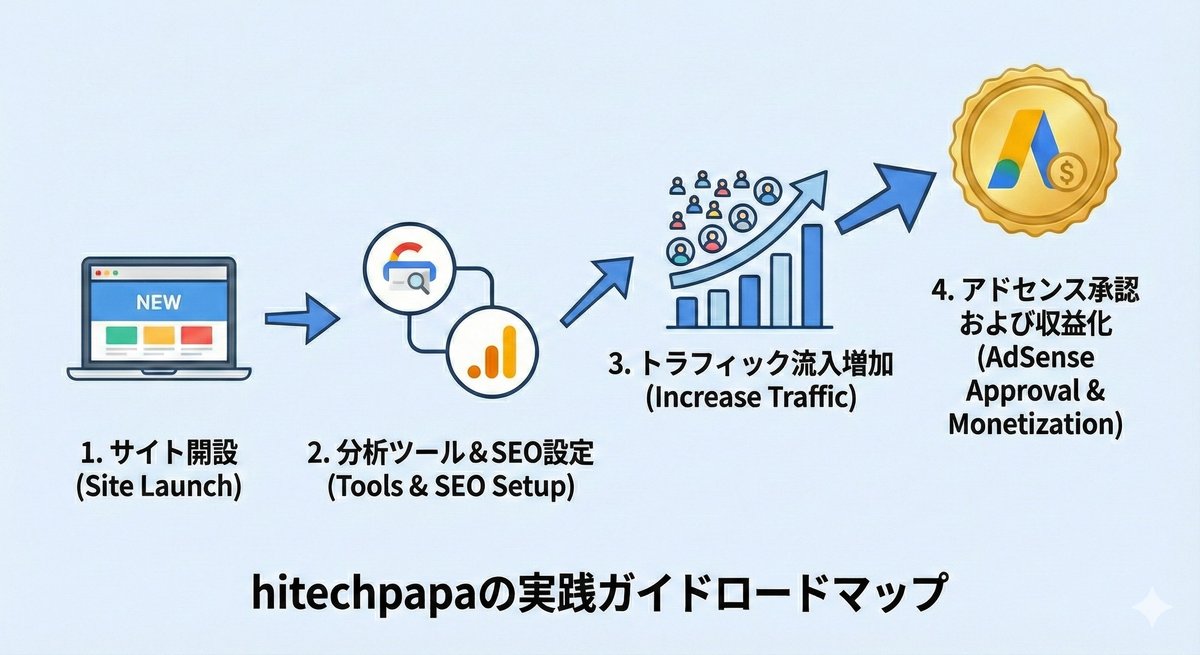
First, connect Google Search Console and Analytics to register your site with search engines and build your analytics foundation. Register with other relevant search platforms for your target market too. Next, apply Google SEO to optimize search visibility. Once these basics are in place, apply for AdSense — and if rejected, keep improving until you get approved.
This process might feel overwhelming at first, but tackling it step by step will lead to good results. AdSense approval is really just the start of monetization — the SEO knowledge and site management skills you accumulate along the way become your most valuable long-term assets.
Keep at it and don't give up. Thanks for reading!