ChatGPT vs Claude vs Gemini — Comparing the Big Three AI Services
OpenAI's ChatGPT, Anthropic's Claude, and Google's Gemini. A comparison of the three leading AI services highlighting each one's strengths, with recommendations for different use cases.
Hi, I'm hitechpapa.
Note: This article is based on my personal experience. AI services evolve constantly, and things change with every new version release. Please read this as a reference point, not the final word.
These days, it's hard to find someone who doesn't use AI services. Conversational AI has become deeply embedded in work, study, creative projects, and countless other areas.
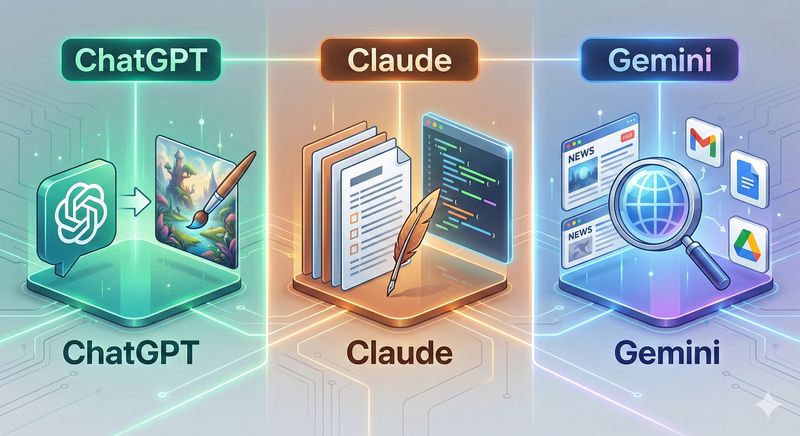
The three most widely used services are OpenAI's ChatGPT, Anthropic's Claude, and Google's Gemini. I use all three, and today I want to compare their respective strengths.
I get asked "Which AI is the best?" a lot. Honestly, there's no single right answer. Each has different strengths, so the best approach is using the right one for each situation. Let's take a look.
ChatGPT — The Pioneer of Conversational AI
ChatGPT, created by OpenAI, is the service that ignited the entire conversational AI boom. Released in late 2022, it made waves worldwide and still has the largest user base.
A Rich Ecosystem and Plugins
One of ChatGPT's biggest advantages is its ecosystem. As the oldest and most widely used service, there's an enormous amount of related content and use cases out there. Search "ChatGPT tips" on YouTube and you'll find countless videos. Blog posts are everywhere.
The plugin and GPTs features are powerful too. You can connect to various external services and use (or create) GPTs customized for specific purposes — research papers, image generation, coding, and more.
Image Generation
ChatGPT offers image generation through DALL-E. Just say "create an image like this" mid-conversation and it generates one instantly. While other AI services also offer image generation, ChatGPT's output quality is quite good and the interface is seamless.
Recent improvements have made the quality strong enough for simple thumbnails and illustrations. It's handy when you need quick visuals for blogs or social media.
Voice Conversation
The ChatGPT app supports voice conversations. You can talk to AI as naturally as calling a friend. The pronunciation is natural and response times are fast — especially useful while driving or when your hands are occupied.
It's great for language practice too. Have a conversation in English and it responds in real time — perfect when you need a practice partner.
Versatility and Stability
ChatGPT handles any topic competently. It may not feel like it has a standout specialty, but flip that around and it means it performs above average across the board. It's the easiest service to recommend for AI newcomers.
Service stability is solid too. With such a large user base, the servers are reliably maintained — sudden outages are rare.
Claude — The Powerhouse for Writing and Coding
Claude is Anthropic's AI service. Anthropic was founded by former OpenAI researchers and is known for placing particular emphasis on AI safety. Personally, Claude is the one I use most.
Outstanding Writing Ability
Claude's greatest strength is writing quality. When producing long-form text, it maintains context beautifully and generates natural prose. The quality holds up well across languages, including English and Asian languages.
For blog posts, reports, emails, and other written content, Claude consistently delivers the most satisfying results, in my experience. It adjusts tone well on request and writes cleanly without unnecessary filler.
Long-Context Processing
Claude can handle an enormous amount of text in a single session. Feed it a lengthy document and it comprehends and analyzes the whole thing effectively. This makes it invaluable for summarizing and analyzing long papers or reports.
Upload a 100-page PDF and ask "summarize the key points" — and it grasps the entire document and produces a clean summary. Other AI services sometimes only read the beginning of long documents or lose content midway. Claude has far fewer of these issues.
Coding Ability
Claude is also strong at coding. Claude Code in particular lets you write and execute code directly in the terminal. I used Claude Code to learn web development, and it was an enormous help.
Ask it to explain code and it walks you through it. Hit an error and it analyzes the cause and suggests solutions. For coding beginners, it's the best teacher you could ask for.
Careful, Accurate Responses
Claude tends to honestly say when it doesn't know something. Compared to other AIs that sometimes confidently state incorrect information, Claude flags uncertainty. For work where accuracy matters, this trait is a real asset.
Its responses are also balanced and measured. On controversial topics, it presents multiple perspectives rather than leaning to one side.
Gemini — Integration with the Google Ecosystem
Gemini is Google's AI service. Built on the tech and data of one of the world's largest companies, it has unique advantages.
Real-Time Information Search
Gemini's biggest strength is access to real-time information. Connected to Google Search, it can answer based on the latest news and data.
While ChatGPT and Claude only know information up to their training cutoff, Gemini can answer questions like "What's the weather today?" in real time. For questions requiring up-to-the-minute information, Gemini has the edge.
Google Services Integration
If you're a heavy user of Gmail, Google Docs, Google Drive, or Google Calendar, Gemini is especially convenient. It integrates with Google Workspace to help organize emails, summarize documents, and manage schedules.
Ask it to "organize the important emails from last week" and it pulls relevant content from Gmail and structures it for you. If you already live in the Google ecosystem, this is incredibly useful.
Generous Free Tier
Gemini offers a relatively broad free usage tier. Basic conversation features work well at no cost, and you just need a Google account to get started. It's easy for AI newcomers to jump in.
Multimodal Capabilities
Gemini processes not just text, but images, video, and audio. Show it a photo and ask "What is this?" and it recognizes and explains it accurately.
Its integration with Google Lens is particularly handy — snap a photo and get instant analysis. Photograph a foreign-language menu for translation, or take a picture of something unfamiliar to get information about it.
YouTube Integration
Gemini can also analyze YouTube videos. Share a YouTube link and ask "summarize this video" — and it does. Great for when you don't have time to watch a long video in full.
Recommendations by Situation
So which AI should you use? Based on my experience, here are my recommendations by use case.
Heavy writing needs → Claude
If you write a lot — blog posts, reports, emails — Claude is the way to go. Its natural prose and long-context processing make it especially useful for extended writing.
Learning to code → Claude
For studying programming or doing development work, Claude is the best pick. Claude Code in particular is an outstanding learning companion.
Need the latest information → Gemini
For today's news, real-time weather, current trends — anything requiring fresh data — Gemini is the answer. Its Google Search integration gives it the edge on real-time information.
Heavy Google user → Gemini
If you rely on Gmail, Google Docs, and other Google services, Gemini is your best friend. The integration features genuinely boost productivity.
Need image generation → ChatGPT
For quick illustrations or thumbnails, ChatGPT's DALL-E feature is the most convenient option. You can generate images naturally within the flow of conversation.
First-time AI user → ChatGPT
For someone trying AI for the first time, ChatGPT is the easiest recommendation. It has the most learning resources available and handles everything competently.
Try All Three
Full disclosure: I use all three services. Using different AIs for different situations is the most efficient approach. Claude for writing, Gemini for current info, ChatGPT for images — that kind of thing.
All three offer free tiers, so I'd recommend just trying them all. You won't know which one fits you best until you actually use them.
AI is no longer optional — it's essential. Any AI is better than none, and using multiple AIs strategically for different situations is even better. I hope this comparison helps you choose.
Next time, I'll do a deeper dive into each AI service. Thanks for reading!
Note: Once again, this article reflects my personal experience. AI services evolve daily, and new models and updates can change each service's characteristics and performance. Check each service's official site for the latest information.