All the Devices I Use as an Engineer Dad
Mac, Windows desktop, Windows laptop -- here's a look at the three computers this engineer dad uses daily, and why each one earns its spot.
Hi, I'm hitechpapa.
Today I want to walk you through the devices I use on a daily basis. Working in IT, my collection of gear has naturally grown over the years. People often ask me, "Why do you have so many computers?" But honestly, each one has a genuine reason for being there.
I currently use three main computers: one Mac, one Windows desktop, and one Windows laptop. Let me explain how I ended up with this setup and what each machine is for.
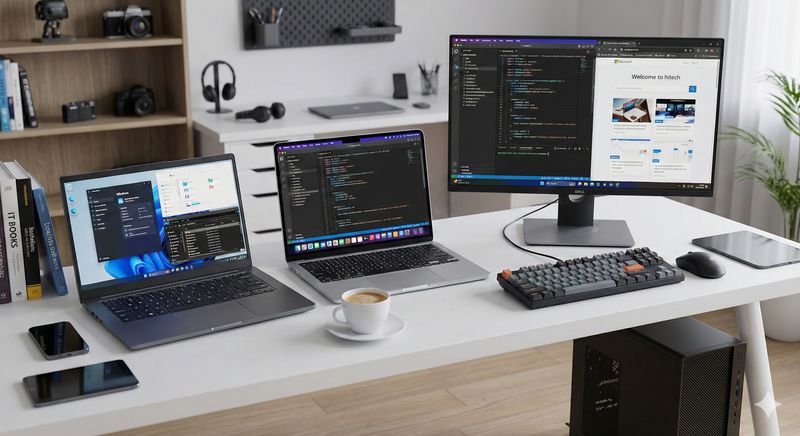
Apple MacBook Air M2
First up is the Apple MacBook Air M2 -- my very first Mac. I'd been a lifelong Windows user, but after hearing so many people rave about Mac, I decided to give it a try.
Long story short: I'm genuinely thrilled with it. It's light -- carrying it around is no burden at all. My previous Windows laptop weighed close to 2kg, but the MacBook Air comes in at roughly 1.2kg. My shoulder thanks me.
The battery life is incredible. I can work at a cafe for 3-4 hours and often still have more than half the battery left. Not having to carry a charger is a freedom I didn't know I was missing.
The M2 chip performs better than I expected. I was initially worried that the Air might feel underpowered compared to the Pro, but for my workload, it's more than enough. I can run a code editor, multiple browser tabs, and terminal processes simultaneously without any lag. Best of all, the fanless design means it's completely silent. When you're deep in focus work, not hearing fan noise makes a real difference in reducing fatigue.
Whenever I need to work outside or take my computer on the go, the MacBook Air is always the one I grab. It's essentially my "mobile main machine."
Windows Desktop
Second is my Windows desktop. It's running an Intel i7 with 16GB RAM and 1TB storage. Nothing flashy, but more than adequate for what I do.
This is my workhorse for serious tasks at home. Connected to a 27-inch monitor, the productivity boost from a large screen is hard to overstate. After working on a laptop screen and switching to a big monitor, you immediately understand why everyone makes such a fuss about monitor size.
The difference is especially noticeable when coding. I can have the code editor on the left and browser or documentation on the right, cutting down on constant window-switching. Comparing files side by side is so much easier on a big screen.
Thermal management is another desktop advantage. Laptops heat up during extended sessions, but a desktop with proper cooling stays stable even under sustained heavy loads. For intensive tasks or running multiple programs simultaneously, the desktop is king.
The obvious trade-off? Zero portability. Which is exactly why I also need a laptop.
Windows Laptop (Intel Ultra5 125H)
Third is my Windows laptop -- the most recent addition. It's got an Intel Ultra5 125H, 24GB RAM, and 512GB storage.
"Why do you need a Windows laptop when you have a MacBook?" I get this question a lot. The answer is simple: some software only runs on Windows. Certain work applications don't have Mac versions, and development sometimes requires testing in a Windows environment.
The Intel Ultra5 125H is a relatively recent CPU, and its power efficiency has impressed me. Battery life is better than expected, and heat management is reasonable. Earlier Intel laptop generations had a reputation for running hot, but this one keeps things under control.
Having 24GB of RAM was a deliberate choice. Development work eats more memory than you'd think. Between a code editor, local server, and a dozen browser tabs, 16GB can start feeling tight. 24GB gives me comfortable headroom.
The 512GB storage seemed potentially tight, but between cloud storage and an external SSD, it hasn't been an issue. And if needed, the drive is swappable down the road.
Why I Ended Up with Multiple Machines
I never planned to use this many computers. It just happened naturally as work demands evolved.
Mac and Windows each have their strengths. Mac offers an easier dev environment setup, Unix-based terminal workflows, beautiful design, and an outstanding trackpad. Windows wins on compatibility, gaming support, and access to specialized software.
The laptop vs. desktop distinction is similar. Laptops are portable but screen-limited; desktops can't travel but provide a superior work environment. Ultimately, using the right tool for the situation is the most efficient approach.
In development work, you don't necessarily need top-tier specs, but you do need a comfortable baseline. Slow builds and laggy window-switching create real friction. So I aim to keep all my machines at a "comfortably capable" level.
Final Thoughts
So that's how I use my MacBook Air, Windows desktop, and Windows laptop -- switching between them based on the situation.
Next time, I'll cover my smartphone, tablet, and peripherals like keyboards and mice. The gadget rabbit hole truly has no bottom.
Thanks for reading!